Slots
If we want to pass more than one content block to the component, self.content is not enough, we can use slots to achieve this.
Unlike other packages which declare slot via {% slot %}, we define the slot in the component class, just like what we defined fields in the Django model
Basic
Create components/blog/blog.py
from django_viewcomponent import component
from django_viewcomponent.fields import RendersOneField


@component.register("blog")
class BlogComponent(component.Component):
    header = RendersOneField(required=True)

    template = """
        {% load viewcomponent_tags %}

        {{ self.header.value }}
    """
Notes:
headeris aRendersOneFieldfield, it means it can only render one content block, and it isrequired.self.header.valuemeans render theheaderslot field, please notevalueis needed here.
To use the component in Django templates:
{% component "blog" as blog_component %}
  {% call blog_component.header %}
    <a href="/">My Site</a>
  {% endcall %}
{% endcomponent %}
Notes:
call blog_component.headermeans we call the slot fieldheaderof theblog_componentThe returning HTML would be:
<a href="/">My Site</a>
Check if the slot is filled
You can use filled attribute of the slot field to check if the slot is filled or not.
{% if self.header.filled %}
    {{ self.header.value }}
{% else %}
    Default title
{% endif %}
Render multiple slots
Let’s update BlogComponent
from django_viewcomponent import component
from django_viewcomponent.fields import RendersOneField, RendersManyField


@component.register("blog")
class BlogComponent(component.Component):
    header = RendersOneField(required=True)
    posts = RendersManyField(required=True)        # new

    template = """
        {% load viewcomponent_tags %}

        {{ self.header.value }}

        {% for post in self.posts.value %}
            {{ post }}
        {% endfor %}
    """
Notes:
postsis aRendersManyFieldfield, it means it can render multiple content blocks, and it isrequired.We use
{% for post in self.posts.value %}to iterate thepostsslot field.
To use the component in Django templates:
{% component "blog" as blog_component %}
  {% call blog_component.header %}
    <a href="/">My Site</a>
  {% endcall %}

  {% call blog_component.posts %}
    <a href="/">Post 1</a>
  {% endcall %}
  {% call blog_component.posts %}
    <a href="/">Post 2</a>
  {% endcall %}

{% endcomponent %}
Notes:
We can call
blog_component.postsmultiple times to pass the block content to the slot fieldposts.
<a href="/">My Site</a>
<a href="/">Post 1</a>
<a href="/">Post 2</a>
Or you can use django for loop do this:
{% component 'blog' as component %}
    {% call blog_component.header %}
        <a href="/">My Site</a>
    {% endcall %}
    {% for post in qs %}
        {% call component.posts %}
            <a href="/">{{ post.title }}</a>
        {% endcall %}
    {% endfor %}
{% endcomponent %}
Note
Developer can use this approach to fill the slot field in a flexible way.
Connect other component in the slot
This is the killer feature of this package, so please read it carefully.
Component argument in RendersOneField
Let’s update the BlogComponent again
from django_viewcomponent import component
from django_viewcomponent.fields import RendersOneField, RendersManyField


@component.register("header")
class HeaderComponent(component.Component):
    def __init__(self, classes, **kwargs):
        self.classes = classes

    template = """
        <h1 class="{{ self.classes }}">
          {{ self.content }}
        </h1>
    """


@component.register("blog")
class BlogComponent(component.Component):
    header = RendersOneField(required=True, component='header')
    posts = RendersManyField(required=True)

    template = """
        {% load viewcomponent_tags %}

        {{ self.header.value }}

        {% for post in self.posts.value %}
            {{ post }}
        {% endfor %}
    """
Notes:
We added a
HeaderComponent, which accept aclassesargumentheader = RendersOneField(required=True, component='header')means when{{ self.header.value }}is rendered, it would use theHeaderComponentcomponent to render the content.
{% component "blog" as blog_component %}

  {% call blog_component.header classes='text-lg' %}
    <a href="/">My Site</a>
  {% endcall %}

  {% call blog_component.posts %}
    <a href="/">Post 1</a>
  {% endcall %}
  {% call blog_component.posts %}
    <a href="/">Post 2</a>
  {% endcall %}

{% endcomponent %}
Notes:
When we call
blog_component.header, theclassesargument is passed to theHeaderComponentautomatically.
The final HTML would be
<h1 class="text-lg">
  <a href="/">My Site</a>
</h1>
<a href="/">Post 1</a>
<a href="/">Post 2</a>
Notes:
We do not need to store the
classesto theBlogComponentand then pass it to theHeaderComponent, just setcomponent='header'in theRendersOneFieldfield, theHeaderComponentwould receive theclassesargument automaticallyIf you check the template code in the
BlogComponent,{{ self.header.value }}ia very simple to help you understand what it is.
Component argument in RendersManyField
If you have
posts = RendersManyField(required=True, component="post")
In the view template
{% component 'blog' as component %}
    {% call component.header classes='text-lg' %}
        <a href="/">My Site</a>
    {% endcall %}
    {% for post in qs %}
        {% call component.posts post=post %}{% endcall %}
    {% endfor %}
{% endcomponent %}
Notes:
qsis a Django queryset, we iterate the queryset and fill the slotpostsmultiple times,postis also passed to thePostComponentautomatically.
The PostComponent can be:
class PostComponent(component.Component):
    def __init__(self, post, **kwargs):
        self.post = post

    template = """
    {% load viewcomponent_tags %}

    <h1>{{ self.post.title }}</h1>
    """
Separation of concerns
The slot field and the component argument can help us build components with separation of concerns.
With component argument, we can connect components together, in clean way.
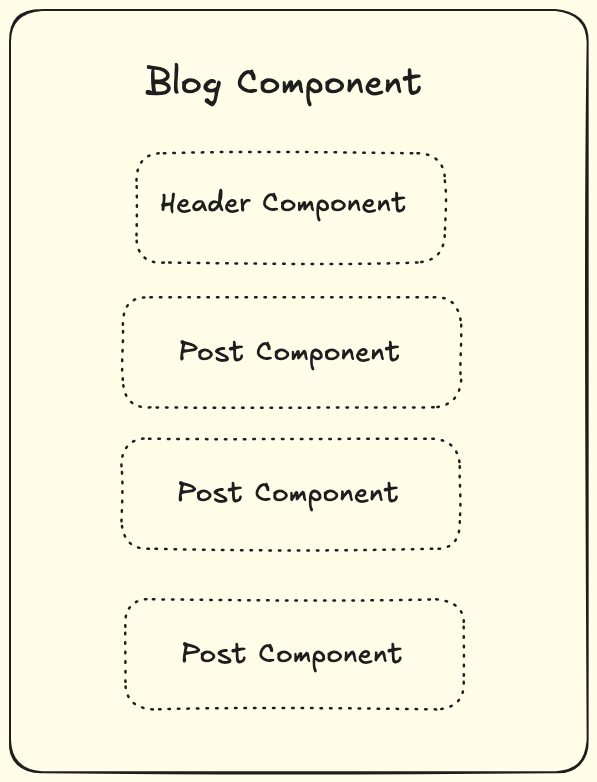
Component argument in slot fields supports different variable types
Component registered name
@component.register("header")
class HeaderComponent(component.Component):
    def __init__(self, classes, **kwargs):
        self.classes = classes

    template = """
        <h1 class="{{ self.classes }}">
          {{ self.content }}
        </h1>
    """


@component.register("post")
class PostComponent(component.Component):
    def __init__(self, post, **kwargs):
        self.post = post

    template = """
        {% load viewcomponent_tags %}

        <h1>{{ self.post.title }}</h1>
        <div>{{ self.post.description }}</div>
        """


@component.register("blog")
class BlogComponent(component.Component):
    header = RendersOneField(required=True, component="header")
    posts = RendersManyField(required=True, component="post")

    template = """
        {% load viewcomponent_tags %}
        {{ self.header.value }}
        {% for post in self.posts.value %}
          {{ post }}
        {% endfor %}
        """
Component class
class BlogComponent(component.Component):
    class HeaderComponent(component.Component):
        def __init__(self, classes, **kwargs):
            self.classes = classes

        template = """
            <h1 class="{{ self.classes }}">
              {{ self.content }}
            </h1>
        """

    class PostComponent(component.Component):
        def __init__(self, post, **kwargs):
            self.post = post

        template = """
        {% load viewcomponent_tags %}

        <h1>{{ self.post.title }}</h1>
        <div>{{ self.post.description }}</div>
        """

    header = RendersOneField(required=True, component=HeaderComponent)
    posts = RendersManyField(required=True, component=PostComponent)

    template = """
    {% load viewcomponent_tags %}
    {{ self.header.value }}
    {% for post in self.posts.value %}
      {{ post }}
    {% endfor %}
    """
Function which return string
If one component is very simple, we can use a function or lambda to return string.
class BlogComponent(component.Component):
    header = RendersOneField(required=True, component="header")
    posts = RendersManyField(
        required=True,
        component=lambda self, post, **kwargs: mark_safe(
            f"""
            <h1>{post.title}</h1>
            <div>{post.description}</div>
        """,
        ),
    )

    template = """
    {% load viewcomponent_tags %}
    {{ self.header.value }}
    {% for post in self.posts.value %}
      {{ post }}
    {% endfor %}
    """
Notes:
Here we use lambda function to return string from the
postvariable, so we do not need to create a Component.We can still use
self.xxxto access value of the blog component.
Function which return component instance
We can use function to return instance of a component, this is useful when we need to pass some special default values to the other component.
class BlogComponent(component.Component):
    header = RendersOneField(required=True, component="header")
    posts = RendersManyField(
        required=True,
        component=lambda post, **kwargs: PostComponent(post=post),
    )

    template = """
        {% load viewcomponent_tags %}
        {{ self.header.value }}
        {% for post in self.posts.value %}
          {{ post }}
        {% endfor %}
        """
Recursive Slot Field Call
Combining render fields and component argument is very powerful, let’s step further to see how to do recursive slot field call.
Let’s assume you are building a generic table components:
Table
    Row
        Cell
Below is code example:
class CellComponent(component.Component):

    template = """
    {% load viewcomponent_tags %}

    <td>{{ self.content }}</td>
    """


class RowComponent(component.Component):

    cells = RendersManyField(component=CellComponent)

    template = """
    {% load viewcomponent_tags %}

    <tr>
        {% for cell in self.cells.value %}
            {{ cell }}
        {% endfor %}
    </tr>
    """


class TableComponent(component.Component):

    rows = RendersManyField(component=RowComponent)

    template = """
    {% load viewcomponent_tags %}

    <table>
       <tbody>
        {% for row in self.rows.value %}
            {{ row }}
        {% endfor %}
      </tbody>
    </table>
    """
TableComponent.rows -> RowComponentRowComponent.cells -> CellComponent
To render the table, we can do it like this:
{% load viewcomponent_tags %}

{% component 'table' as table_component %}
    {% for post in qs %}
        {% call table_component.rows as row_component %}   -> Here we get the component of the slot field as `row_component`
            {% call row_component.cells %}                 -> We just fill the slot field by calling row_component.cells
                <h1>{{ post.title }}</h1>
            {% endcall %}
            {% call row_component.cells %}
                <div>{{ post.description }}</div>
            {% endcall %}
        {% endcall %}
    {% endfor %}
{% endcomponent %}
Notes:
To render
table cell, we do not need to explicitly use{% component 'table_cell' %}, but using{% call row_component.cells %}to do this in elegant way.
The final HTML would seem like:
<table>
  <tbody>
  <tr>
    <td>
      <h1>post title</h1>
    </td>
    <td>
      <div>post desc</div>
    </td>
  </tr>
  </tbody>
</table>
Polymorphic slots
Polymorphic slots can render one of several possible slots.
For example, consider this list item component that can be rendered with either an icon or an avatar.
class ListItemComponent(component.Component):
    item = RendersOneField(
        types={
            "avatar": AvatarComponent,
            "icon": lambda key, **kwargs: IconComponent(key=key),
        },
    )
The values in types can be the same as component argument in RendersOneField, it can be a string, a class, a function
Filling the slot is done calling {field}_{type}, please note the type key is set as suffix to the slot field.
{% load viewcomponent_tags %}

{% component 'list_item' as component %}
    {% call component.item_avatar alt='username' src='http://some-site.com/my_avatar.jpg' %}{% endcall %}
{% endcomponent %}

{% component 'list_item' as component %}
    {% call component.item_icon key='arrow-down' %}{% endcall %}
{% endcomponent %}